Article
Play2开发环境搭建
用惯了MAVEN后,在用SBT真有种生不如死的感觉。Maven更沉稳成熟些,SBT感觉首先不熟(入门也没maven简单)并且随性。
好了抱怨了这么多。入题,主要碰到的就是两个问题:
- Play2的HelloWorld主要卡在网络(也就是sbt的配置);
- 导入Eclipse。由于有Maven缺各种插件的体验,这里直接用官网的生成好.class/.project再导入已经存在的项目。
接下来一步步的介绍环境的搭建。
# 下载Play2和SBT
下载官网的Offline Distribution ,解压后把 activator-dist-1.3.12/repository 的所有文件拷贝到 ~/.ivy2/cache 。反正都会下载到这个目录,拷贝更快。
下载SBT ,下载zip就好。
# 配置
- 在 activator-dist-1.3.12 创建 conf/sbtconfig.txt 。同时在 sbt/conf/sbtconfig.txt 加上同样的语句:
-Dsbt.override.build.repos=true
- 添加获取jar的repo地址,新建 ~/.sbt/repositories 文件
[repositories]
  local
  local-maven: file:///D:/maven/.m2/repository/
  cu: http://cu1:8081/nexus/content/groups/public/
  #oschina: http://maven.oschina.net/content/groups/public/
  jcenter: https://jcenter.bintray.com/
  typesafe-ivy-releases: https://repo.typesafe.com/typesafe/ivy-releases/, [organization]/[module]/[revision]/[type]s/[artifact](-[classifier]).[ext], bootOnly
  maven-central
  ivy-typesafe: http://dl.bintray.com/typesafe/ivy-releases, [organization]/[module]/(scala_[scalaVersion]/)(sbt_[sbtVersion]/)[revision]/[type]s/[artifact](-[classifier]).[ext]
  ivy-sbt-plugin: http://dl.bintray.com/sbt/sbt-plugin-releases/, [organization]/[module]/(scala_[scalaVersion]/)(sbt_[sbtVersion]/)[revision]/[type]s/[artifact](-[classifier]).[ext]
配置相关参考:
- http://9leg.com/scala/2015/10/17/scala-play-setting.html
- https://afoo.me/posts/2014-11-05-how-make-sbt-jump-over-GFW.html
- https://www.jfrog.com/confluence/display/RTF/SBT+Repositories +
- http://www.scala-sbt.org/0.13/docs/zh-cn/Library-Dependencies.html
- http://www.scala-sbt.org/0.13/docs/Proxy-Repositories.html
# 创建新项目
添加环境变量自己主动点,activator和sbt都加一下。然后运行 activator new 根据模板创建项目。也可以参考官网的直接写build.sbt。
R:\>activator new helloworld play-java
ACTIVATOR_HOME=E:\local\usr\share\activator-dist-1.3.12

Fetching the latest list of templates...

OK, application "helloworld" is being created using the "play-java" template.

To run "helloworld" from the command line, "cd helloworld" then:
R:\\helloworld/activator run

To run the test for "helloworld" from the command line, "cd helloworld" then:
R:\\helloworld/activator test

To run the Activator UI for "helloworld" from the command line, "cd helloworld" then:
R:\\helloworld/activator ui
创建好项目后,运行 activator run 看看效果:
R:\helloworld>activator run
ACTIVATOR_HOME=E:\local\usr\share\activator-dist-1.3.12
[info] Loading project definition from R:\helloworld\project
[info] Updating {file:/R:/helloworld/project/}helloworld-build...
[info] Resolving org.fusesource.jansi#jansi;1.4 ...
[info] Done updating.
[info] Set current project to helloworld (in build file:/R:/helloworld/)
[info] Updating {file:/R:/helloworld/}root...
[info] Resolving jline#jline;2.12.1 ...
[info] Done updating.

--- (Running the application, auto-reloading is enabled) ---

[info] p.c.s.NettyServer - Listening for HTTP on /0:0:0:0:0:0:0:0:9000

(Server started, use Ctrl+D to stop and go back to the console...)
打开浏览器访问 http://localhost:9000 ,访问的时刻可能会实时的编译会等一段时间。
# 导入eclipse
前面已经把helloworld跑起来了,接下来是把功能导入eclipse。直接导入或者手动加classpath挺麻烦的,play的一些配置会最终会编译class的。
这里使用 sbteclipse 来生成 eclipse 项目需要的文件。
- https://www.playframework.com/documentation/2.5.x/IDE
- https://github.com/typesafehub/sbteclipse
- https://github.com/typesafehub/sbteclipse/wiki/Using-sbteclipse
需要配置二个文件,先添加插件、然后修改配置。
在 helloworld/project/plugins.sbt 最后添加 sbteclipse 插件:
addSbtPlugin("com.typesafe.sbteclipse" % "sbteclipse-plugin" % "5.0.1")
在 helloworld/build.sbt 最后添加配置:
import com.typesafe.sbteclipse.plugin.EclipsePlugin.EclipseKeys
// Compile the project before generating Eclipse files, so that generated .scala or .class files for views and routes are present
EclipseKeys.preTasks := Seq(compile in Compile)
EclipseKeys.projectFlavor := EclipseProjectFlavor.Java           // Java project. Don't expect Scala IDE
EclipseKeys.createSrc := EclipseCreateSrc.Default + EclipseCreateSrc.ManagedClasses // Use .class files instead of generated .scala files for views and routes
EclipseKeys.withSource := false
EclipseKeys.withJavadoc := false
然后用 sbt eclipse 生成IDE项目所需文件:
R:\helloworld>sbt
Java HotSpot(TM) 64-Bit Server VM warning: ignoring option MaxPermSize=256m; support was removed in 8
[info] Loading project definition from R:\helloworld\project
[info] Updating {file:/R:/helloworld/project/}helloworld-build...
[info] Resolving org.fusesource.jansi#jansi;1.4 ...
[info] Done updating.
[info] Set current project to helloworld (in build file:/R:/helloworld/)

[helloworld] $ eclipse
[info] About to create Eclipse project files for your project(s).
[info] Updating {file:/R:/helloworld/}root...
[info] Resolving jline#jline;2.12.1 ...
[info] Done updating.
[info] Compiling 6 Scala sources and 10 Java sources to R:\helloworld\target\scala-2.11\classes...
[info] Successfully created Eclipse project files for project(s):
[info] helloworld

[helloworld] $ compile
[success] Total time: 3 s, completed 2016-11-10 13:11:49

[helloworld] $ eclipse
[info] About to create Eclipse project files for your project(s).
[info] Successfully created Eclipse project files for project(s):
[info] helloworld
[helloworld] $
我这是专门重新弄的一个工程,依赖是原来已经下载好了的(下载需要等一段时间)。
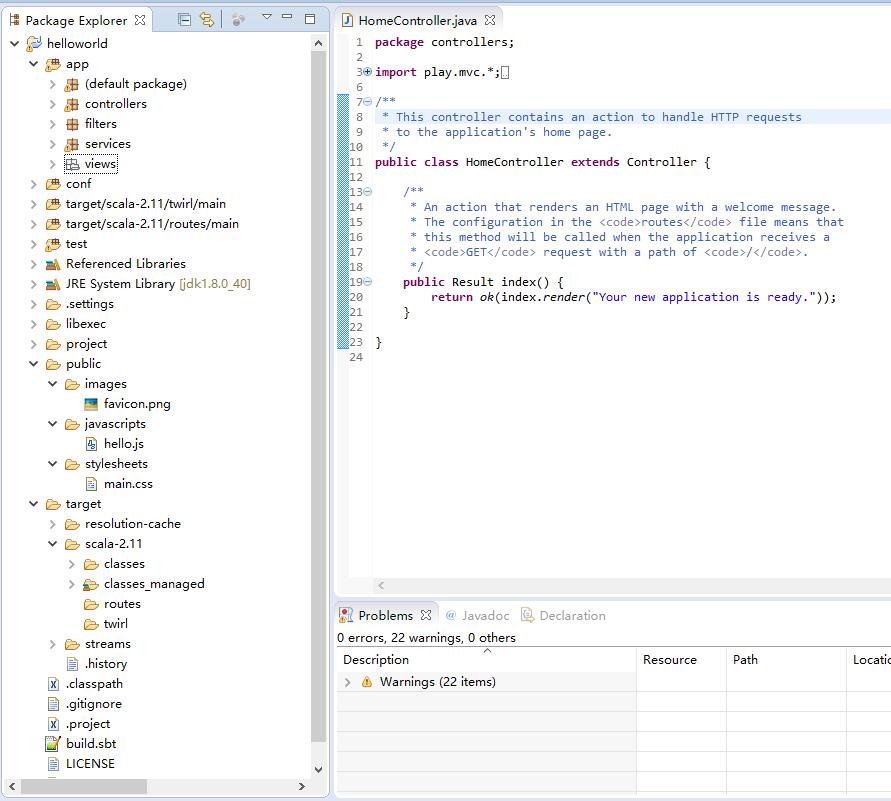
然后导入已经存在的项目即可。看最终效果图:
–END
Related
Related posts
-
杀鸡焉用牛刀:DuckDB 正取代部分 Spark 场景
2026-02-16
-
基于对象存储的 Spark 数据读写实战:从末尾追加到任意更新
2025-10-28
-
jarsperreports生成PDF中文问题
2017-01-21
-
jasperreports使用小结
2016-12-01