Article
Windows搭建Flutter桌面开发环境一步到位
想用Flutter开发Windows桌面应用?本文将带你从零开始搭建开发环境,只需简单4步即可运行第一个桌面应用!
# 下载并安装必备工具
# 安装Git版本管理工具
开发过程中代码管理离不开Git,请按以下步骤安装:
1、访问官网下载便携版:https://git-scm.com/downloads/win
2、下载Git for Windows/x64 Portable版本
3、解压到 C:\PortableGit 目录
4、将Git添加到系统PATH环境变量
# 安装Flutter SDK
我们使用稳定的3.29.3版本:
1、下载地址:https://docs.flutter.dev/install/archive 中的 3.29.3 版本
2、解压到C:\flutter_windows_3.29.3-stable目录
注意路径不要包含中文或空格。
# 安装VS Code开发工具
1、官网下载安装包:https://visualstudio.microsoft.com/zh-hans/
2、安装完成后,在扩展商店搜索安装:Flutter、Dart、Flutter Widget Snippets插件
# 配置环境变量
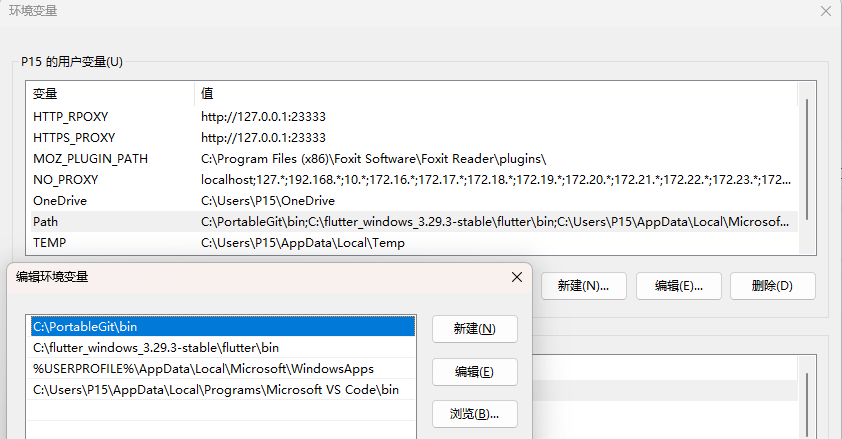
# 设置系统环境变量
打开系统设置:设置 -> 系统 -> 系统信息 -> 高级系统设置 -> 环境变量,在系统变量的Path中添加:
C:\flutter_windows_3.29.3-stable\flutter\bin
C:\PortableGit\bin
同时配置网络代理环境变量
HTTP_PROXY=http://127.0.0.1:23333
HTTPS_PROXY=http://127.0.0.1:23333
NO_PROXY=localhost;127.*;192.168.*;10.*;172.16.*;172.17.*;172.18.*;172.19.*;172.20.*;172.21.*;172.22.*;172.23.*;172.24.*;172.25.*;172.26.*;172.27.*;172.28.*;172.29.*;172.30.*;172.31.*
# 验证
打开命令提示符运行,输入flutter --version:
C:\Users\P15>flutter --version
Flutter 3.29.3 • channel stable • https://github.com/flutter/flutter.git
Framework • revision ea121f8859 (7 weeks ago) • 2025-04-11 19:10:07 +0000
Engine • revision cf56914b32
Tools • Dart 3.7.2 • DevTools 2.42.3
# 检查环境并完善
运行检查环境命令flutter doctor:
PS C:\Users\P15>flutter doctor

Doctor summary(to see all details,run flutter doctor -v):
[√]Flutter(channel stable,3.29.3,on Microsoft Windows【版本10.0.22631.3447],locale zh-CN)
[√]WindowsVersion(11专业版64位,23H2,2009)
[x] Android toolchain-develop for Android devices
  x Unable to locate Android SDK.
    Install Android Studio from: https://developer.android.com/studio/index.html
    On first launch it will assist you in installing the Android SDK components.
    (or visit https://flutter.dev/to/windows-android-setup for detailed instructions).
    If the Android SDk has been installed to a custom location, please use
    flutter config--android-sdk'to update to that location .

[√]Chrome -develop for the web
[x]Visual Studio -develop Windows apps
  x Visual Studio not installed: this is necessary to develop Windows apps.
    Download at https://visualstudio.microsoft.com/downloads/
    Please install the "Desktop development with C++" workload, including all of its default components
[!]Android Studio (not installed)
[√]VS Code(version 1.100.2)
[√]Connected device(3 available)
[√]Network resources
环境缺少android和c++。
# 安装Android开发环境
1、下载Android Studio https://developer.android.com/studio?hl=zh-cn ,安装时勾选Android SDK
2、用android studio 安装cmdline-tools
3、配置android sdk路径,并接受其许可协议:
flutter config --android-sdk C:\Android\SDK flutter doctor --android-licenses
# 安装Visual Studio C++工具
安装Visual Studio 2022 https://visualstudio.microsoft.com/zh-hans/ ,工作负载页签中选择"使用C++的桌面开发"(Desktop development with C++)。
# Hello World!
# 通过模板创建工程
PS C:\Users\P15> flutter create hello_world
Creating project hello_world...
Resolving dependencies in `hello_world`... (1.0s)
Downloading packages...
Got dependencies in `hello_world`.
Wrote 130 files.

All done!
You can find general documentation for Flutter at: https://docs.flutter.dev/
Detailed API documentation is available at: https://api.flutter.dev/
If you prefer video documentation, consider: https://www.youtube.com/c/flutterdev

In order to run your application, type:

  $ cd hello_world
  $ flutter run

Your application code is in hello_world\lib\main.dart.

PS C:\Users\P15> code .\hello_world\
# 运行
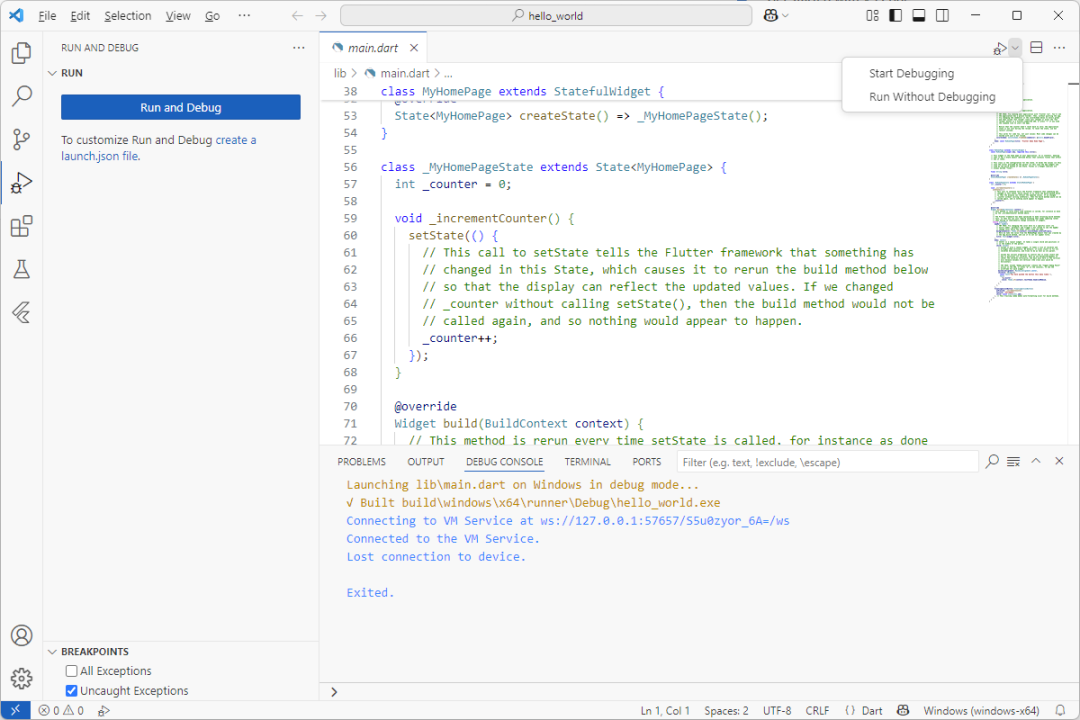
使用vscode打开hello_world目录,打开lib/main.dart文件,然后点击右上角的运行按钮。
Related
Related posts
-
appium-Android自动化测试
2020-04-12
-
乱码:Windows开发成长必由之路
2025-11-18
-
conjure-dart 更新:别名类型 alias 代码生成实现
2025-11-16
-
MVC 常用常新,温故知新:纵你虐我千百遍 我仍待你如初见
2025-09-10